Quick facts
- Launcher
- PojavLauncher
- Minecraft Java
- V1.21
- Launcher release
- Gladiolus
- Platforms
- Android, iOS (sideload), Windows, Mac, Linux
- Maintainer
- PojavLauncherTeam (open-source community)
- Android APK size
- ~147 MB
- Download source
- Download on this site
- Also searched as
- pojav launcher, pojavlauncher apk, pojav laucher, pojavlaucher, pojav launcher apk, pojavlauncher mod apk, pojav launcher download, pojavlauncher 1.21
- Not affiliated with
- Play Store clones, APK mirrors, fake App Store apps
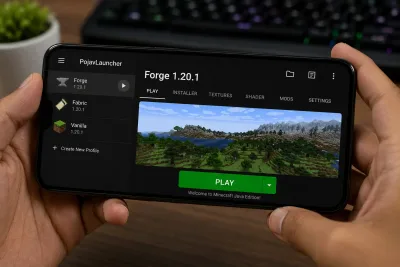
PojavLauncher brings Minecraft Java Edition to phones, tablets, and desktop systems that cannot run the official launcher comfortably. That opens the door to the same mod ecosystem PC players use — Forge, Fabric, performance tweaks, and selective shader experiments — but mobile hardware and renderer limits mean modding on PojavLauncher requires more patience and version discipline than a typical Windows setup.
This guide explains how to install mods on PojavLauncher in 2026: choosing a mod loader, finding the correct mods folder, installing step by step, and fixing the errors that appear most often in community support threads. If you have not installed the launcher yet, start with the PojavLauncher download page and verify you are using the verified build on this site, not a repackaged Play Store clone.
Quick Answer
The fastest reliable path is: (1) install PojavLauncher from the verified download on this site, (2) pick either Forge or Fabric for a specific Minecraft version, (3) install that loader through the launcher or its documented method, (4) place matching .jar mod files in games/PojavLauncher/.minecraft/mods, and (5) launch using the Forge/Fabric profile. Add one mod at a time so crashes are easy to trace.
Do not mix Forge and Fabric mods in the same profile. Do not drop Bedrock .mcaddon packs into the Java mods folder — they are different games under the hood. For crashes after modding, see PojavLauncher not working fixes.
Forge vs Fabric on PojavLauncher
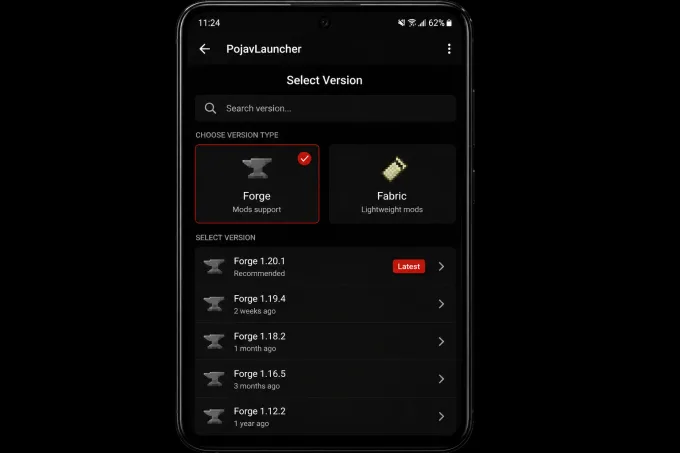
Minecraft Java mods depend on a mod loader — a layer that hooks into the game and loads third-party code. On PojavLauncher, the two loaders you will see most often are Minecraft Forge and Fabric. Both work on many PojavLauncher builds, but they are not interchangeable.
| Factor | Forge | Fabric |
|---|---|---|
| Typical use | Larger mod packs, older ecosystems (1.7–1.20+) | Lighter mods, newer versions, many QoL mods |
| Ecosystem size | Huge archive on CurseForge | Strong on Modrinth and CurseForge |
| Performance on mobile | Can be heavier; large packs stress RAM | Often lighter per mod, but shaders still costly |
| Install style | Forge installer / launcher mod menu | Fabric installer + Fabric API (often required) |
| Mixing loaders | Never mix with Fabric in one profile | Never mix with Forge in one profile |
When to choose Forge: You want a specific Forge-only mod, an older pack (e.g., 1.12.2 or 1.16.5 content), or you are following a tutorial that explicitly lists Forge. Many classic tech and adventure mods still target Forge on mid-tier versions.
When to choose Fabric: You want performance-oriented or utility mods on newer Minecraft versions (1.18+, 1.20+, 1.21+ depending on PojavLauncher support). Fabric’s lighter footprint can help on devices with limited RAM, but you still must respect GPU limits.
Quilt and other loaders: Quilt is a Fabric fork on some versions. Treat it as a separate ecosystem — Quilt mods do not always run on plain Fabric. On PojavLauncher, prioritize standard Forge or Fabric until the basics are solid; exotic loaders raise crash risk with fewer mobile tutorials.
Version matching rule: If your profile runs Minecraft 1.20.1, your Forge or Fabric build must also say 1.20.1. A 1.20.4 mod does not belong on 1.20.1. The loader version must match too — “close enough” is how most crashes start.
Classic multiplayer note: many competitive servers still ask for 1.8.9 (or another pinned version). Install that exact Java release in PojavLauncher before joining — the launcher version and the Minecraft version are not the same thing.
PojavLauncher updates sometimes lag behind the newest Minecraft patch day-one. Before you download mods, open the launcher and confirm which versions appear in your install list. Build your mod list around what PojavLauncher actually runs, not what the PC launcher shows on release day.
Where Is the Mods Folder?
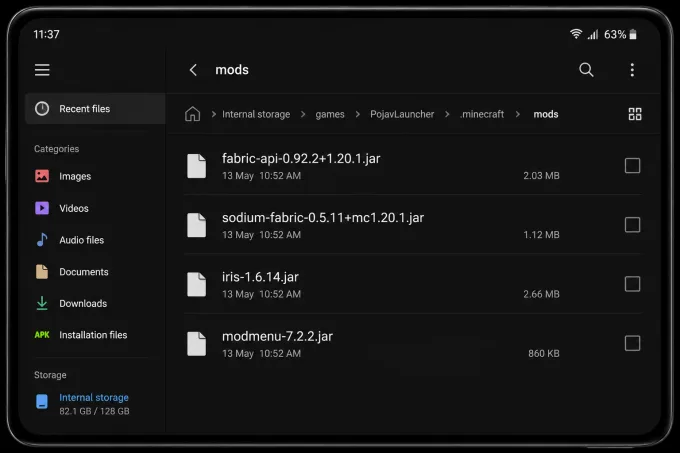
The mods folder is inside PojavLauncher’s game directory — its version of .minecraft. This is separate from any PC installation you may already have.
Default paths by platform
| Platform | Typical mods folder path |
|---|---|
| Android | /storage/emulated/0/games/PojavLauncher/.minecraft/mods/ |
| Android (alt) | /sdcard/games/PojavLauncher/.minecraft/mods/ |
| iOS | On-device Files path shown in PojavLauncher settings (varies by sideload build) |
| Windows / Linux / macOS | User-selected game directory → .minecraft/mods/ |
On Android, the easiest approach is often:
- Open PojavLauncher.
- Go to Settings → Game directory (wording may vary slightly by version).
- Use Open or attach a file manager to jump directly to the folder.
- Create a folder named
modsinside.minecraftif it is missing.
Forge and Fabric both expect plain .jar files in mods (unless a mod’s readme says otherwise). Do not nest mods inside random subfolders unless the author requires it — most loaders scan only the top level of mods.
Resource packs belong in .minecraft/resourcepacks, not mods. Shader packs (when supported) usually go in .minecraft/shaderpacks with a renderer and mod combo that understands them — see the shaders section below.
Backup tip: Before your first mod session, copy the entire games/PojavLauncher/.minecraft folder to another location or SD card. If a mod corrupts a world or config, you can restore quickly.
Step-by-Step Mod Installation
Follow this sequence from a clean state. Skipping steps is how people end up with ten incompatible JARs and no idea which one crashed the game.
1. Install verified PojavLauncher
Download only from the verified download on this site. Avoid Play Store listings that reuse the PojavLauncher name with ads or fake update screens — see Is PojavLauncher safe? for a full trust checklist.
2. Create or select a Minecraft version
In PojavLauncher, install the Minecraft version you want to mod. Launch vanilla once to generate folders and confirm the game runs. If vanilla already crashes, fix that before adding mods — mod loaders multiply problems that already exist.
3. Install Forge or Fabric
Option A — PojavLauncher built-in installer (when available): Many builds expose Forge/Fabric in a mod-loader or install menu. Pick your game version and let the launcher download components.
Option B — Manual install: Download the Forge or Fabric installer for your version on PC, run the installer with the game directory pointed at PojavLauncher’s .minecraft folder (you can copy the folder path from settings), or use the universal JAR methods documented on the loader’s site.
For Fabric, download Fabric Loader and, when needed, Fabric API. Most Fabric mods list Fabric API as a dependency on Modrinth or CurseForge. Without it, the game may crash immediately.
4. Add mods one at a time
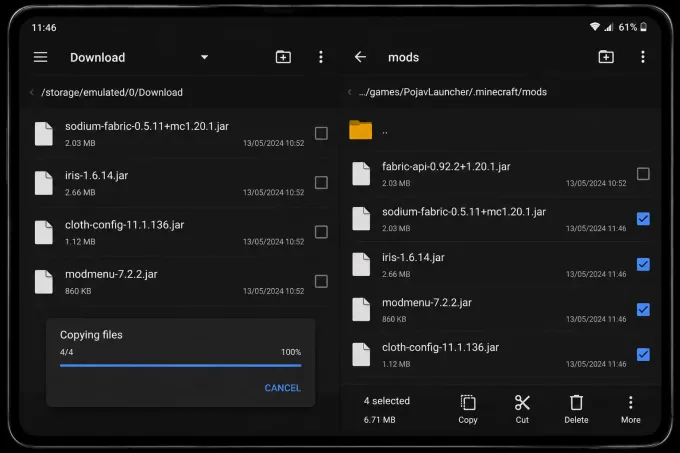
Download mods from official sources:
Place each .jar in mods. For your first session, add one mod, launch, reach the title screen or a test world, then exit cleanly. Repeat. This is slower than bulk copying, but when something breaks you know exactly which file caused it.
5. Tune JVM and RAM
Open PojavLauncher settings for RAM allocation and JVM arguments. Light Fabric QoL mods might run at 2–3 GB on a phone with 6 GB total system RAM. Heavier Forge packs may need 4–6 GB on supported devices. If you allocate almost all system RAM, Android may kill PojavLauncher in the background — leave headroom.
6. Read logs when something fails
On crash, open .minecraft/logs/latest.log. Search for Caused by: near the bottom. Typical messages mention missing dependencies, wrong Minecraft version, or class loading errors. Remove the offending mod, verify dependencies, and try again.
Suggested first-test mods (lightweight)
These are examples of categories that often stress systems less than full tech packs — always verify version tags before downloading:
| Category | Examples (check version pages) | Notes |
|---|---|---|
| Performance helpers | Sodium, Lithium, FerriteCore (Fabric) | Strong on PC; mobile gains vary by GPU driver |
| UI / inventory | Mods tagged lightweight on Modrinth | Good first test after loader install |
| Gameplay tweaks | Small QoL mods with few dependencies | Avoid world-gen overhauls on first test |
Avoid installing twenty mods before the first successful Forge/Fabric launch. Establish a working baseline, then expand.
Managing mod dependencies
Modern mods rarely ship alone. A minimap mod might require a library mod; a tech mod might require both Forge and Cloth Config. CurseForge and Modrinth list Dependencies on each project page — read them before downloading.
| Dependency type | What to do |
|---|---|
| Required | Download exact version listed; place in mods |
| Optional | Skip until base mod works |
| Embedded / JiJ | Usually bundled inside the main JAR — do not extract manually unless docs say so |
| Wrong loader | Fabric API will not help on Forge — separate files |
When Fabric crashes instantly with NoClassDefFoundError mentioning net/fabricmc, you almost always forgot Fabric API. Bookmark the API page for your Minecraft version alongside every Fabric mod you install.
Copying mods from a PC installation
Many players maintain a PC .minecraft/mods folder and want the same list on PojavLauncher. You can copy JARs only when the Minecraft version and mod loader match exactly between PC and mobile profiles. Do not copy the entire PC .minecraft folder onto Android — paths, Java version, and native libraries differ.
Workflow:
- Export a text list of mod names and versions from PC.
- Match PojavLauncher to the same Minecraft + Forge/Fabric versions.
- Copy JARs via USB, cloud storage, or SD card into
games/PojavLauncher/.minecraft/mods. - Launch mobile with half the PC list first — mobile GPUs may not survive the full desktop pack.
World and save compatibility
Mods that change world generation (new ores, biomes, structures) attach data to saves. Opening a heavily modded world after removing mods causes chunk errors or crashes. Before modding a survival world you care about:
- Copy the world folder from
saves/to backup storage. - Test the same seed and mod set in a throwaway creative world.
- Document which mods are required for the save to load.
If you share worlds with friends, every player needs matching mods for gameplay mods — not just you.
Shaders, OptiFine, and Performance Mods
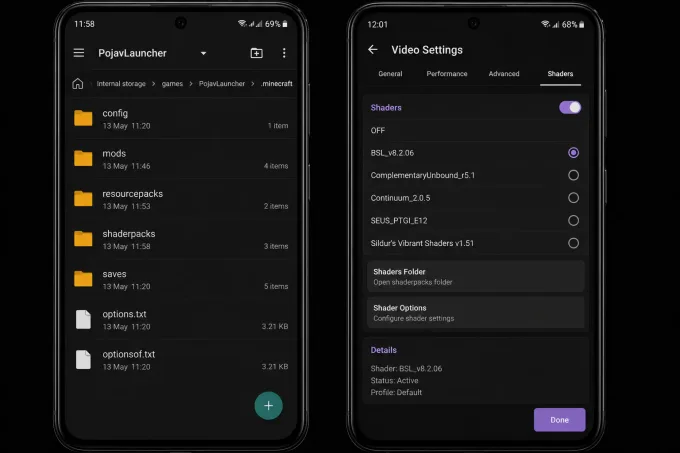
Shaders are the most requested feature and the most common source of disappointment on mobile. PojavLauncher uses OpenGL translation layers (such as gl4es or Zink, depending on settings and build). Desktop shader packs assume desktop GPUs and drivers. Some packs work; many do not, or they run at unplayable frame rates.
OptiFine
OptiFine is a Forge-oriented optimization and shader bridge mod. On PojavLauncher:
- It may work on certain versions and devices.
- It can conflict with other performance mods.
- Shader packs designed for OptiFine still need enough GPU headroom.
Treat OptiFine as an experiment: install on a test profile, launch a small world, and expect possible black screens or driver resets on weaker phones. If OptiFine fails, remove it and try non-shader performance mods compatible with your loader.
Iris / Sodium (Fabric)
On Fabric, Sodium and related performance mods are popular on PC. Mobile support changes over time — read the mod page for ARM/Android notes. Iris connects Sodium to shader packs on supported setups. Do not assume a PC tutorial automatically applies; confirm PojavLauncher version, Minecraft version, and mod builds together.
Shader pack expectations
| Expectation | Reality on PojavLauncher |
|---|---|
| ”Same shaders as my RTX PC” | Unlikely at the same settings |
| Medium shader packs | May work on flagship phones, unstable elsewhere |
| Heavy ray-traced-style packs | Usually impractical |
| Fallback | Lower render distance, no shaders, performance mods |
Reduce render distance, disable fancy graphics options, and close background apps before shader tests. If the screen goes black but audio plays, see black screen fixes.
Common Mod Installation Errors
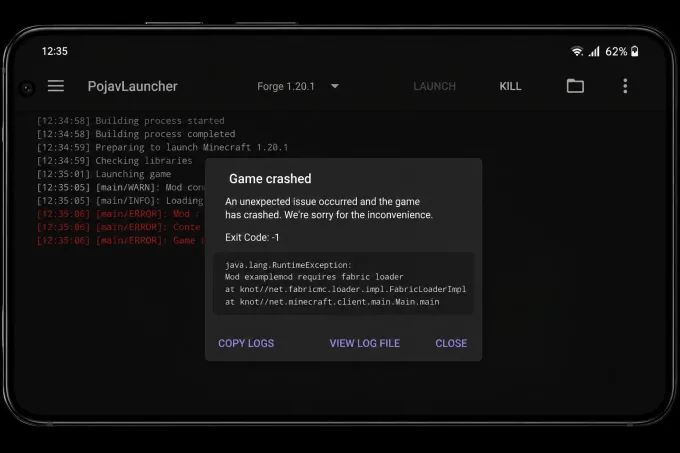
”Game crashed on startup” right after adding mods
Cause: Version mismatch, missing Fabric API, corrupt download, or desktop-only mod.
Fix: Remove all mods from mods, launch vanilla. Add loader only, launch. Add mods back one by one. Re-download from official pages if a JAR looks unusually small.
”Incompatible mod set” or Forge dependency errors
Cause: Wrong Forge build, or mods compiled for different minor versions.
Fix: Reinstall the exact Forge version the mod pack requests. Check mods.toml or the mod’s CurseForge relations tab for required versions.
Black screen after mods + shaders
Cause: GPU driver timeout, unsupported shader, or OptiFine conflict.
Fix: Remove shader pack and OptiFine/Iris first. Clear .minecraft/shaderpacks if needed. Lower graphics settings. Switch renderer option in PojavLauncher if your build allows it.
Out of memory / java.lang.OutOfMemoryError
Cause: Too many mods or RAM set too low.
Fix: Increase allocation modestly, remove heavy world-gen mods, lower render distance. If RAM is already high, lower it — on some devices overly aggressive allocation backfires.
Mod works on PC but not PojavLauncher
Cause: Mod uses JNI, custom natives, or assumes x86 architecture.
Fix: Check mod issues for Android or ARM mentions. Some mods never targeted mobile. Look for alternatives tagged Fabric/Forge without native libraries.
Play Store “PojavLauncher mod APK” with mods preinstalled
Cause: Unofficial repack — not from PojavLauncherTeam.
Fix: Uninstall, scan device if you distrust the source, install from the verified download on this site only. Pre-bundled mod APKs are a common adware pattern. Details in Is PojavLauncher safe?.
latest.log messages decoded (quick reference)
| Log phrase | Likely meaning | Action |
|---|---|---|
The Mod File ... has mods that were not found | Missing dependency mod | Install required library JAR |
Incompatible mod set! | Forge version mismatch | Reinstall correct Forge build |
java.lang.UnsupportedClassVersionError | Mod compiled for newer Java than runtime | Update PojavLauncher or pick older mod build |
Failed to create GLFW window | Graphics/renderer issue | See black screen fixes |
Class loading errors + mod name | That mod is incompatible with mobile | Remove or find ARM-friendly alternative |
Keep the last 50 lines of latest.log when asking for help in community forums — screenshots of the home screen alone rarely show the failing class name.
Multiplayer and server mods
Client-only mods (HUD, zoom, inventory tweaks without server-side logic) often work on vanilla servers. Gameplay mods (guns, magic, new blocks) require the server to run the same mod pack. PojavLauncher does not bypass server enforcement — if the server is vanilla 1.20.1, your Forge 1.20.1 client with tech mods will not join.
For community servers, read the server listing for exact mod pack links. Use the server’s recommended launcher workflow when provided; PojavLauncher can run many packs if versions align.
Frequently Asked Questions
The FAQ block above the footer collects structured answers for search and schema. For platform-specific install paths (iOS sideload, PC builds, Chromebook), read PojavLauncher on iOS, PC & Chromebook. For login and Microsoft account errors after modding, see PojavLauncher not working fixes.
Modding on PojavLauncher is absolutely possible — thousands of players run Fabric QoL setups or lighter Forge packs daily — but mobile modding rewards careful version matching and modest expectations about shaders. Start small, use official sources, and keep backups. When in doubt, test in a new creative world before touching a survival world you care about.
Quick reference card
| Step | Action |
|---|---|
| 1 | Verified APK only — download on this site |
| 2 | Pick Forge or Fabric for one Minecraft version |
| 3 | Install loader → empty mods test launch |
| 4 | Add mods one JAR at a time from Modrinth/CurseForge |
| 5 | Read latest.log on crash; check dependencies |
| 6 | Shaders last — after stable vanilla + loader + light mods |
Bookmark this page alongside PojavLauncher FAQ for 2026 updates when new Minecraft versions ship and mobile GPU guidance changes in release notes.